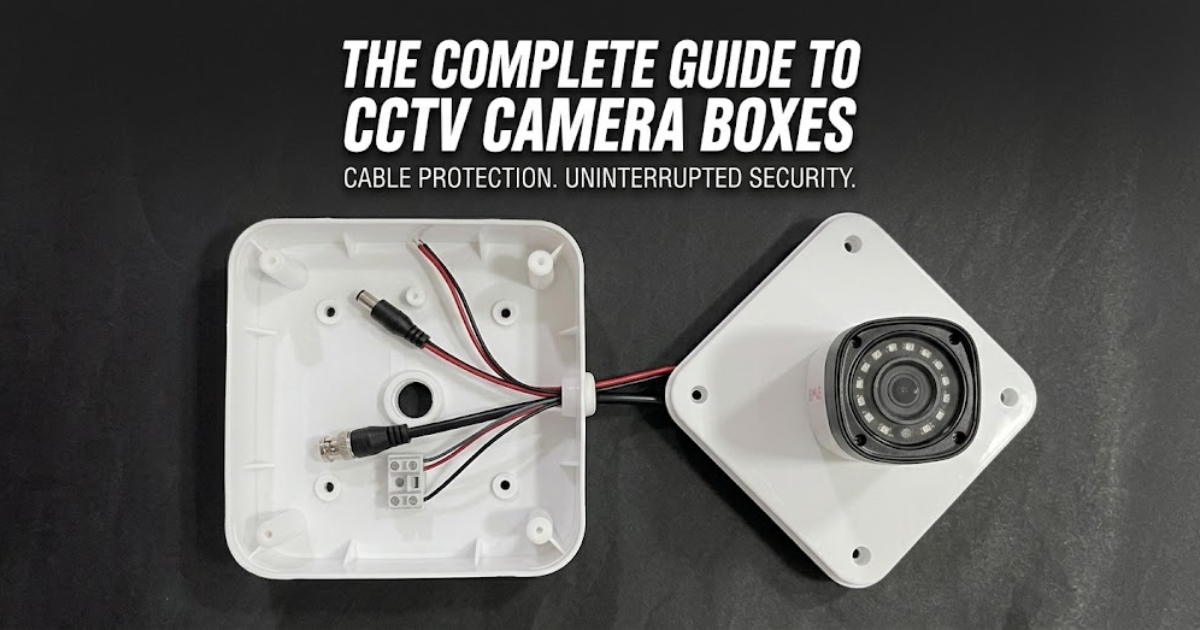
When designing or installing a CCTV security network for an Indian property—whether it is a residential apartment in Mumbai, a commercial warehouse in Gujarat, or an industrial plant in Rajasthan—most people focus almost entirely on hardware specifications. Buyers spend days comparing megapixel counts, low-light color night vision capabilities, AI motion detection, and DVR/NVR storage capacities.This is where the CCTV camera box (also widely referred to as a CCTV junction box, deep base, or camera enclosure) plays a vital role.
This comprehensive guide covers everything you need to know about CCTV camera boxes: what they are, how they function, why they are mandatory for Indian environmental conditions, how to choose the right material, step-by-step installation practices, and key maintenance strategies to ensure your security system operates 24/7 without interruption.
What is a CCTV Camera Box?
A CCTV camera box is a compact, rigid, protective enclosure installed directly between the mounting surface (such as a concrete wall, brick pillar, or metal pole) and the security camera itself. Its primary job is to create a secure, weatherproof cavity that holds, routes, and isolates sensitive cabling joints and power couplers.
[ Wall / Mounting Surface ]
│
▼
┌─────────────────────────┐
│ CCTV Camera Box │ ◄── Houses BNC, DC Pin, RJ45,
└─────────────────────────┘ & Power Adapters safely inside
│
▼
[ Bullet / Dome Camera ]
When a technician installs a CCTV camera without a junction box, the wire harness coming out of the camera stem hangs loosely or is tucked awkwardly into a hole in the wall. This leaves fragile connection points vulnerable to water ingress, dust accumulation, physical strain, and intentional tampering.
By mounting the camera directly onto the lid of a specialized camera box, all wire joints remain housed within a sealed internal chamber, completely isolated from outdoor elements.
Essential Components Inside a CCTV Camera Box
Inside a typical CCTV camera box, you will find and protect several crucial connection points:
- BNC Connectors (Analog/HD-TVI/CVI/AHD): Bayonet Neill–Concelman connectors used to pass analog video signals over coaxial cable.
- DC Power Jacks: Male and female barrel pins delivering 12V DC power from the central power supply unit (SMPS) to the camera.
- RJ45 Ethernet Couplers (IP Cameras): Modular connectors carrying data and Power over Ethernet (PoE) power in IP camera setups.
- Video Baluns: Passive or active transformers used to convert coaxial video signals for transmission over twisted-pair Cat5e/Cat6 cables.
- Excess Wire Slack: Extra loop allowance of Ethernet or RG59 coaxial cable needed for future re-stripping and maintenance.
Core Functions: Why a CCTV Camera Box is Essential
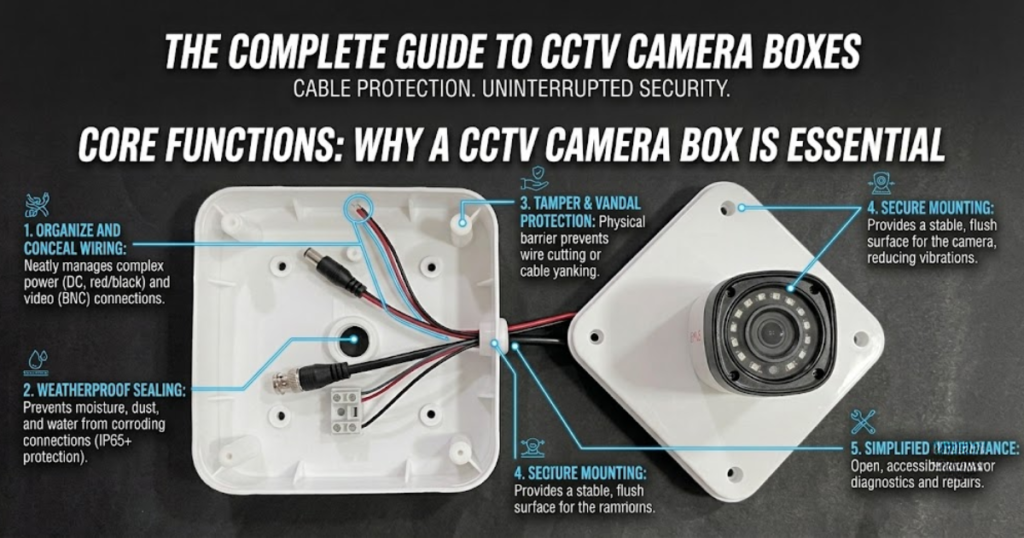
Installing security cameras without junction boxes is one of the most common mistakes in low-cost security setups. Here is a detailed breakdown of why every camera requires a dedicated enclosure.
┌───────────────────────────────────────────────┐
│ BENEFITS OF A CCTV BOX │
└───────────────────────┬───────────────────────┘
│
┌───────────────────┬─────────────┴───────┬───────────────────┐
▼ ▼ ▼ ▼
┌───────────────┐ ┌───────────────┐ ┌───────────────┐ ┌───────────────┐
│ Weatherproof │ │ Anti-Tamper │ │ Neat Cable │ │ Easier Service &│
│ Protection │ │ Security │ │ Management │ │ Diagnostics │
└───────────────┘ └───────────────┘ └───────────────┘ └───────────────┘
1. Protection Against India’s Extreme Weather Conditions
India’s climatic diversity poses severe challenges to electronic installations. Security cameras are expected to run continuously through distinct, aggressive weather cycles:
- Monsoon Rainfall & High Humidity: Heavy rains, coastal humidity, and moisture condensation quickly penetrate unsealed electrical joints. When water contacts raw copper pins inside a BNC connector or RJ45 plug, it triggers instant oxidation, rust, and short-circuiting. This results in rolling video lines, static noise, or total signal loss.
- Extreme Summer Heat & UV Radiation: Outdoor temperatures in northern and central regions frequently cross 40∘C to 48∘C in summer. Direct sunlight degrades standard electrical tape within months, causing it to peel off and expose raw wire joints. High-quality CCTV junction boxes are made from UV-stabilized materials that withstand intense, prolonged sun exposure without cracking.
- Dust and Particulate Accumulation: Airborne dust, fine sand, and industrial smog coat external wire joints. Over time, dust mixed with atmospheric moisture forms a conductive paste that creates cross-talk between signal and power lines.
A properly sealed weatherproof CCTV camera box (IP65/IP66 rated) uses silicone rubber gaskets and cable entry glands to keep the internal chamber totally dry and dust-free year-round.
2. Tamper Prevention and Vandal Resistance
Security cameras are installed to deter crime, but exposed cables make the cameras themselves vulnerable targets.
Without a camera box, an intruder can easily disable the system in seconds:
- Snipping exposed 12V power wires with simple wire cutters.
- Unplugging the BNC or RJ45 connector directly behind the camera stem.
- Yanking the cable harness down to snap internal solder joints inside the camera arm.
When a camera is installed with a heavy-duty PVC or die-cast metal box, all wires pass straight through the back of the box directly into the wall conduit, or enter through screwed-tight cable glands. No wires remain exposed to plain sight or physical reach, making it virtually impossible for vandals to cut the feed without heavy tools and significant noise.
3. Electrical Insulation and Ground-Loop Prevention
Directly mounting metal camera bases onto raw metal surfaces (such as tin-roof sheds, structural steel pillars, or iron poles) often creates electrical grounding issues known as ground loops. Ground loops introduce severe video hum bars, horizontal line distortion, and rolling rolling noise across monitor screens.
Quality plastic or insulated junction boxes act as an electrical barrier between metal building structures and the camera body. This isolates the camera from stray electrical currents, static electricity charges, and high-voltage surges that travel along structural steel frame networks.
4. Professional Aesthetics and Cable Management
For residential homes, corporate offices, retail stores, and luxury venues, overall visual appearance matters. Loose wires wrapped in multi-colored electrical tape hanging beneath a modern 4K dome camera create an untidy, unprofessional impression.
A CCTV camera box allows installers to hide all wire loops, connectors, and power splitters inside a clean, compact enclosure. Available in white, grey, and black finishes, junction boxes blend smoothly into painted plaster, tiles, marble, or exposed concrete finishes.
5. Streamlined Maintenance and Diagnostics
When a security camera loses power or video signal, technicians must run diagnostic tests on the physical connections.
- Without a Junction Box: Technicians must pull meters of wire back through tight wall holes, cut away degraded electrical tape, or break plaster to locate loose joints.
- With a Junction Box: Technicians simply remove 2 to 4 front panel screws on the faceplate to access the neatly organized wire joints inside. Repairs, testing, and connector replacements take only a few minutes without damaging nearby wall finishes.
Detailed Comparison: CCTV Box Materials
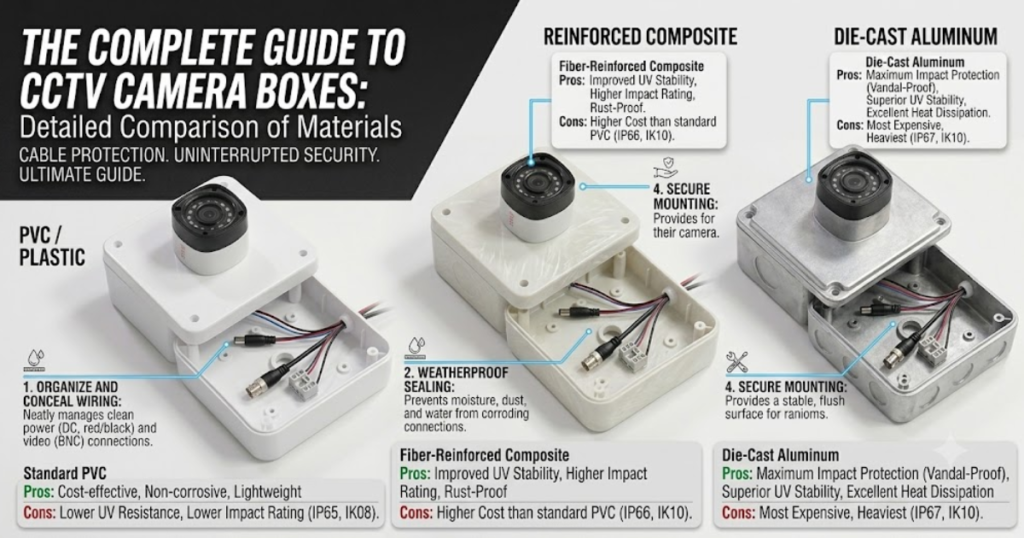
Choosing the correct material for your CCTV junction box ensures long-term performance and prevents unnecessary maintenance costs.
| Feature / Metric | Standard ABS Plastic | UV-Stabilized Polycarbonate | Die-Cast Aluminum Metal |
| Ingress Protection (IP) | IP55 – IP65 | IP66 – IP67 | IP66 – IP68 / IK10 |
| Impact Resistance | Moderate (Shatters under heavy hit) | High (Flexible & Impact Resistant) | Extreme (Vandal-Proof / Anti-Blow) |
| UV Sun Resistance | Low (Yellows & turns brittle in 1-2 yrs) | High (Resists sun degradation 5+ yrs) | Superior (Weather-proof powder coat) |
| Rust & Corrosion | 100% Non-Corrosive | 100% Non-Corrosive | Non-Corrosive (If coating is intact) |
| Best Used For | Indoor offices, hallway ceilings | Outdoor residential walls, rooftops | Industrial sites, petrol pumps, highway poles |
| Price Point (INR) | Low (₹40−₹100) | Moderate (₹120−₹300) | High (₹350−₹1000+) |
Comprehensive Classification: Types of CCTV Camera Boxes
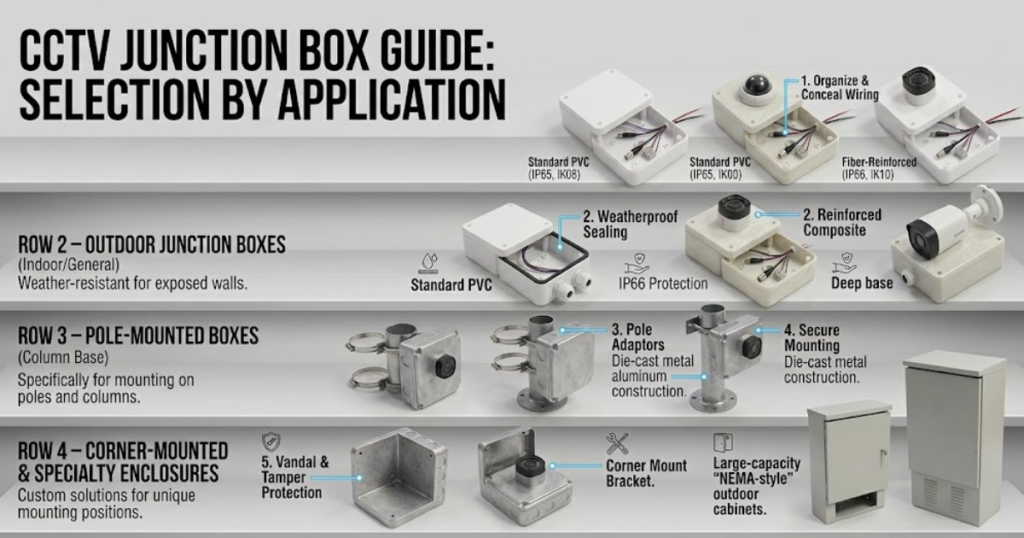
Not all camera installations use the same mounting surfaces or face identical environmental risks. Different installation types require specific box designs:
┌─────────────────────────────────────────┐
│ CCTV CAMERA BOX TYPES │
└────────────────────┬────────────────────┘
│
┌───────────────────┬─────────────┴─────────────┬───────────────────┐
▼ ▼ ▼ ▼
┌─────────────────┐ ┌─────────────────┐ ┌─────────────────┐ ┌─────────────────┐
│ Square/Octagonal│ │ Deep Base Mounts│ │ Pole Mount │ │ Recessed/Flush │
│ Junction Boxes │ │ (Custom Fit) │ │ Enclosures │ │ In-Wall Boxes │
└─────────────────┘ └─────────────────┘ └─────────────────┘ └─────────────────┘
1. Standard Square and Octagonal PVC Junction Boxes
These are the most popular, cost-effective options used across general domestic and light commercial jobs.
- Design: Square (4×4 inch) or round octagonal box featuring a flat cover lid with rubber entry grommets on four sides.
- Mounting Method: Box is screwed to the wall; camera base is screwed onto the front flat lid.
- Best Uses: Indoor ceiling mounts, covered balconies, small retail stores, and home entryways.
2. Camera-Specific Deep Base Mounts
Deep bases are engineered by major camera manufacturers (such as Hikvision, Dahua, CP PLUS, and Honeywell) specifically for their own bullet and dome camera models.
- Design: Made from color-matched die-cast aluminum or heavy polycarbonate, matching the exact diameter and screw-hole pattern of the camera foot.
- Mounting Method: Screw holes align directly with the camera base, creating a seamless, integrated, single-piece look.
- Best Uses: High-end architectural homes, premium commercial lobbies, and outdoor perimeter walls where aesthetics are critical.
3. Pole-Mount Enclosures with Hose Clamps
Mounting cameras onto round metal street poles, boundary light poles, or highway gantries requires specialized hardware.
- Design: Features a flat-front junction box attached to a rear curved bracket with heavy-duty stainless steel worm-gear hose clamps.
- Best Uses: Gated community entry barriers, industrial perimeters, smart city traffic monitoring, and parking lot poles.
4. Recessed / Flush In-Wall Boxes
For luxury interiors, modern apartments, and premium office spaces, exposed surface-mounted boxes may disrupt interior design plans.
- Design: The main body of the box is embedded inside a chiseled wall cavity during masonry construction, leaving only a flush faceplate exposed.
- Best Uses: Interior feature walls, executive boardrooms, art galleries, and modern residential corridors.
Technical Specifications & IP Ratings Explained
When reviewing camera box specifications, you will often see technical ratings such as IP65, IP66, or IK10. Understanding these codes helps you select the right box for your environment.
Ingress Protection (IP) Code Breakdown
An IP rating consists of two numbers defining how well the box seals out solids and liquids:
IPSolid Protection6Liquid Protection6
First Digit (Protection against Solid Objects & Dust)
- 5: Dust-protected. Ingress of dust is not entirely prevented, but does not enter in quantities that interfere with safe operation.
- 6: Dust-tight. Full protection against dust infiltration and fine airborne particles.
Second Digit (Protection against Liquids & Water)
- 5: Protected against water jets projected by a nozzle (6.3 mm) from any direction.
- 6: Protected against powerful water jets (12.5 mm high-pressure nozzles) and heavy driving rainstorms.
- 7: Protected against temporary submersion in water under defined conditions of pressure and time (up to 1 meter depth for 30 minutes).
Pro Tip: For outdoor security camera installations anywhere in India, always select junction boxes with a minimum rating of IP65. For coastal, heavy rain, or dusty industrial areas, opt for IP66 or IP67 boxes.
Step-by-Step Installation Guide
Proper installation of a CCTV camera box ensures a fully watertight seal and long-term setup reliability.
┌─────────────────────────────────────────────────────────────────────────┐
│ STEP 1: Surface Preparation & Cable Hole Drilling │
└────────────────────────────────────┬────────────────────────────────────┘
│
▼
┌─────────────────────────────────────────────────────────────────────────┐
│ STEP 2: Mounting the Junction Box Base to Wall/Ceiling │
└────────────────────────────────────┬────────────────────────────────────┘
│
▼
┌─────────────────────────────────────────────────────────────────────────┐
│ STEP 3: Cable Entry & Gland Sealing (Use Rubber Grommets/Glands) │
└────────────────────────────────────┬────────────────────────────────────┘
│
▼
┌─────────────────────────────────────────────────────────────────────────┐
│ STEP 4: Wire Termination (BNC/DC/RJ45 Connections) │
└────────────────────────────────────┬────────────────────────────────────┘
│
▼
┌─────────────────────────────────────────────────────────────────────────┐
│ STEP 5: Mounting Camera to Box Lid & Securing Gaskets │
└─────────────────────────────────────────────────────────────────────────┘
1: Surface Preparation and Marking
- Hold the base of the camera box against the wall or ceiling at your target installation height.
- Use a spirit level to align the box evenly. Mark the mounting screw holes and central cable entry point onto the wall using a marker.
- Drill the wall holes using an appropriate masonry drill bit size (6 mm or 8 mm) and insert durable plastic wall plugs (Grip/Gitti).
2: Cable Entry and Box Installation
- Drill the central hole through the wall for cable routing if bringing cables from inside the building.
- Route the main line cable (3+1 Coaxial or Cat6) into the back or side entry port of the CCTV box.
- Crucial Step: Fit a rubber cable gland or tight grommet around the entry hole. If cables run along an exterior wall, always create a downward drip loop in the cable before it enters the box. This prevents rainwater from trickling along the cable body directly into the box port.
- Fasten the CCTV box base firmly to the wall using stainless steel or galvanized screws.
3: Wire Termination and Connection
- Strip the cable jacket neatly inside the box, leaving roughly 6−8 inches of working lead length.
- Terminate wire ends securely using high-grade BNC connectors and DC jacks for analog systems, or crimp pass-through RJ45 connectors for IP network systems.
- Plug the camera’s tail harness connectors into the main line connectors inside the box.
- Wrap connection joints with self-amalgamating waterproof silicone tape as an added secondary layer of protection.
4: Final Assembly and Weather Sealing
- Mount the camera foot onto the pre-drilled holes on the front cover lid of the junction box using short machine screws and rubber washers.
- Arrange all internal wire loops neatly inside the box cavity without crimping or crushing the cable sheath.
- Ensure the main internal silicone perimeter gasket is seated correctly in its edge groove along the box rim.
- Align the front cover lid onto the box base and tighten all corner screws evenly in a cross-pattern.
- Apply a thin bead of neutral-cure silicone sealant along the top and side edges where the box meets the wall plaster. Leave the bottom edge unsealed so any internal condensation can drain naturally.
Key Mistakes to Avoid During Installation
To prevent avoidable service calls and system failures, avoid these common setup errors:
no leave unused knock-out holes unsealed without rubber plugs.
NOT forget to form a “drip loop” in outdoor cables before entry.
DO NOT crush or fold internal fiber optic or Ethernet cabling inside small boxes.
NOT use cheap acidic silicone sealant (which corrodes internal copper wiring over time).
No over-tighten corner screws on plastic boxes, which distorts gaskets and ruins seals.
- Omitting the Drip Loop: Running cables downward directly into the top of a box allows water to enter through gravity. Always enter from the bottom or side with an upward cable curve.
- Leaving Unused Knock-outs Open: Most plastic junction boxes feature punch-out wiring holes on all four sides. If an installer punches out an extra hole by mistake and leaves it open, insects, spiders, and moisture will quickly enter the box.
- Over-Tightening Screws: Excess force when driving screws into plastic box faceplates can warp or crack the outer frame. This distorts the rubber gasket and breaks the watertight seal.
- Using Low-Grade Electrical Tape: Standard black PVC electrical tape quickly degrades, unravels, and leaves a sticky, non-waterproof residue under summer heat. Always use self-amalgamating silicone tape or heat-shrink tubing inside junction boxes.
Frequently Asked Questions (FAQs)
Q1: Is a CCTV camera box mandatory for indoor installations?
While water ingress is less of a risk indoors, a CCTV box is still highly recommended. It conceals excess cable loops, provides a stable mounting surface on false ceilings (such as Gypsum or Grid ceilings), isolates electrical noise, and keeps cable connections organized and secure from accidental pulling during routine cleaning.
Q2: How do I select the right size box for my camera?
For standard residential bullet or dome cameras using 3+1 coaxial or Cat6 cables, a standard 4×4 inch (100×100 mm) box with a depth of 2 inches (50 mm) provides ample space. If you are using active video baluns, POE extenders, or bulky inline power adapters, step up to a 5×5 inch or 6×6 inch enclosure to prevent wire crowding.
Q3: What is the difference between a CCTV junction box and a deep base?
A standard junction box is a general-purpose square or round plastic box that works with any camera brand using universal mounting screws. A deep base is a specialized enclosure designed by a specific manufacturer (like Hikvision or CP PLUS) to match the exact footprint, diameter, color, and screw alignment of a specific camera model.
Q4: Can insects or geckos build nests inside a CCTV camera box?
If the box is installed correctly with sealed cable grommets and tight perimeter gaskets, pests cannot enter. However, if cable knock-out holes are left open, geckos, ants, and spiders frequently enter seeking warmth, which can short-circuit exposed DC power pins.
Q5: Can I mount a heavy outdoor PTZ (Pan-Tilt-Zoom) camera on a plastic box?
No. Heavy PTZ speed dome cameras weigh significantly more than fixed cameras and experience constant movement and wind load. You should mount PTZ cameras on heavy-duty die-cast aluminum metal brackets or cast alloy junction boxes anchored directly to load-bearing walls or steel posts using expansion bolts.